Selection and Cursors Icon Pack: Versatile Design Asset
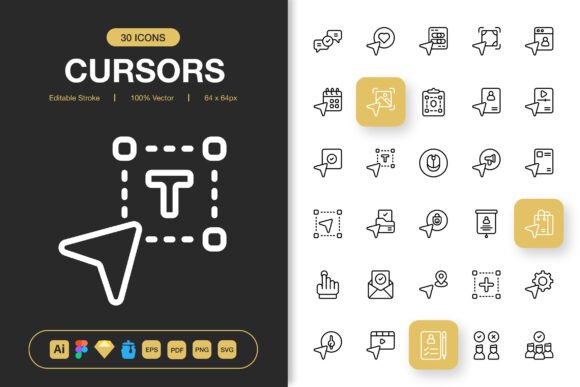
Interface design thrives on details that users barely notice—until they disappear. The Selection and Cursors Icon Pack delivers exactly that: a refined set of high-quality icons built around familiar pointer, grab, crosshair, and selection states. Rather than a generic bundle, this collection focuses on precision and clarity, offering symbols that feel instantly intuitive whether they sit inside a web app, a mobile prototype, or a printed instruction booklet. Because the pack provides editable strokes, multiple source files, and transparent PNGs at seven sizes, it slides into almost any workflow without forcing you to rebuild assets from scratch.
What Comes Inside the Icon Set
Anyone who has hunted through scattered free libraries knows the frustration of missing formats. This pack removes that friction. Inside the download you will find:
- An Adobe Illustrator source file for deep vector editing
- A Figma file ready for component libraries
- An Iconjar file for quick drag-and-drop access inside macOS
- A Sketch file that respects nested symbols
- EPS Version 10 for maximum compatibility
- A PDF file for print-ready placement
- An SVG folder with clean, well-structured code
- Transparent PNG files at 32px, 48px, 64px, 96px, 128px, 256px, and 512px
- A Readme.txt that explains licensing and usage notes
These options cover the needs of interface designers who build interactive components, developers who implement pixel-precise cursors, and publishers who drop icons into layout software. You are not locked into one ecosystem, which makes the pack a safe investment even if your tool stack changes later.
Why Different Audiences Notice Different Benefits
A single icon pack can solve surprisingly varied problems. Understanding how different people value the same asset helps you decide whether the set fits your particular situation. Five distinct perspectives often emerge.
For Beginners and Self-Taught Creators
When you are still learning to navigate Figma or Illustrator, an icon pack that arrives half-baked creates more obstacles than it removes. Here, the Selection and Cursors Icon Pack stands out because every icon maintains a consistent stroke weight, simple geometry, and clear anchor points. Beginners can drag a PDF or PNG straight into a slide deck or Canva project, see immediate results, and gradually open the editable stroke files as their confidence grows. The readme file also answers small but important questions—like whether you can recolor the icons for a dark theme—without requiring you to dig through forums. That balance of immediate usefulness and learning potential makes the pack especially valuable for students, hobbyists, and career switchers assembling their first portfolio pieces.
For Freelancers and Small Studio Designers
Time equals income when you bill by the project. Freelancers rarely enjoy the luxury of drawing a four-state cursor interaction from scratch for a client landing page. Having a complete set of selection icons—arrows, hands, zoom tools, resize handles, text cursors—available in Sketch and Figma means you can build prototypes that look production-ready within minutes. Since the strokes are fully editable, matching a brand’s accent color or adjusting line thickness to meet accessibility contrast ratios becomes a three-click task. The PNG transparency sizes are practical as well: you can use the 64px version for a clickable tutorial overlay and the 256px variant for a hi-res mockup without pixelation. For freelancers who want to present polished work but keep their subscription costs reasonable, having a one-time resource that works across multiple client projects adds clear commercial value.
For Educators and Content Authors
Clear communication often depends on small visual cues. A teacher building a technology literacy lesson or a technical writer explaining a software interface needs symbols that readers instantly recognize. The cursor icons in this pack—pointers, I-beams, crosshairs—reduce the cognitive load of instructional diagrams. Because PDF and SVG versions are included, an educator can place them into a worksheet, a slideshow, or an online course platform without converting formats. The icons are also neutral enough to avoid looking outdated after one season, which matters when you prepare materials intended to stay relevant for several semesters. For bloggers and social media content creators who occasionally need to illustrate a “how to navigate settings” post, the PNG files provide a quick visual without requiring design software at all.
For Product Teams and UX Professionals
Consistency across an entire application is a quiet marker of quality. When the hand cursor on a draggable card differs from the grab cursor shown during an onboarding flow, users feel a subtle discord. The Selection and Cursors Icon Pack helps teams enforce a single visual language for all interactive states. The Iconjar file becomes particularly useful here—designers can store the set alongside their other system icons and drag items directly into Sketch or Figma without ever leaving their canvas. The editable stroke feature also allows accessibility-focused teams to thicken lines for low-vision modes or add a slight background circle. And because the pack includes source files rather than just flattened exports, a design system owner can adapt every icon to match a customized component library, then re-export at needed sizes. This long-term reusability matters more to a product team than a one-time graphic need.
For Small Business Owners and Marketers
When you run a small business, visual assets often get repurposed across several channels—a cursor icon might appear in a website tooltip, a printed flyer for a digital workshop, a social media carousel, and a banner for a local event. The file variety in this pack supports that versatility. A non-designer business owner can open a PNG, place it on a promotional graphic, and trust that the transparent background will look clean on any color. Meanwhile, a marketer who works collaboratively with a freelance designer can share the Illustrator or EPS file and ask for exact brand color matching. Since the theme of selection and cursors is universally understood, the icons fit naturally into any industry, from tech support to real estate, without feeling like generic clip art.
Matching the Icon Pack to Your Project Type
Some visual tools shine only in a narrow context. The Selection and Cursors Icon Pack is designed to work across a broader range, but certain use cases let its strengths surface most clearly.
Websites and Mobile Applications
Interactive prototypes rely on clear affordance signals. Dragging, tapping, selecting text, pinching to zoom—all these actions need an associated cursor or gesture icon. The SVG and PNG sizes cover everything from tiny tap-target indicators to full-screen tutorial overlays. Developers can reference the exact icon file names from the pack when working with a design handoff, preventing mismatches between the mockup and the live build.
Books, Manuals, and Printed Guides
The EPS and PDF versions handle print production requirements without converting or upscaling. Authors writing about digital tools often need to show a mouse pointer inside a screenshot, but embedding a native cursor from the operating system can lead to licensing issues. Using these royalty-free icons instead keeps the layout clean and legally safe. The high-resolution PNGs also work well in monochrome interiors where gradients and excessive detail would print poorly.
Infographics, Flyers, and Posters
Adding a subtle cursor icon to a data visualization can reinforce a digital theme. Marketing flyers for a webinar or an online course benefit from small “click here” arrows that communicate action without adding visual weight. The 100 customizable nature of the strokes means you can adjust the icon’s personality—thicker lines for a more playful event poster, thinner lines for a professional conference announcement.
Social Media and Short-Form Content
Creators making carousel posts on platforms like LinkedIn or Instagram frequently need icons that indicate “swipe,” “tap,” or “select.” The PNG transparency lets them layer a cursor directly over a phone mockup, creating a quick tutorial visual in minutes. Because multiple sizes are included, you avoid uploading an oversized image that a platform might compress unexpectedly.
How the Editable Stroke Feature Changes Your Workflow
Not all icon packs treat strokes as independent paths. The Selection and Cursors Icon Pack builds every shape around adjustable strokes. That design choice matters more than many realize. Changing the stroke width can turn a delicate UI cursor into a bold instructional graphic without losing crisp edges. If your brand uses rounded terminals, you can adjust the cap style inside Illustrator or Figma and apply the change to the entire set. Similarly, recoloring a stroke for a light-on-dark interface requires selecting the stroke attribute rather than painstakingly filling complex shapes. For teams that maintain multiple product themes—say a light employee portal and a dark customer dashboard—this flexibility removes hours of manual rework.
Quick Drag-and-Drop Access for Speed
Speed often determines whether a detailed asset gets used or ignored. Iconjar integration makes the pack instantly accessible on a Mac, letting you drag any selection cursor into your design file in the same motion you would drag a font style. For Figma users, the Figma file itself acts as a ready-made component page; you can duplicate the frame into your project and start swapping icons immediately. Even outside dedicated design tools, dragging a PNG into a presentation software or a document editor takes seconds. This ease of use lowers the barrier for team members who are not full-time designers, encouraging them to use consistent visuals instead of stray screenshots.
Quality Without Overstatement
Visual quality in an icon pack is easier to demonstrate than to describe. These cursors and selection symbols maintain clean alignment, even spacing, and a harmonious silhouette. The pack avoids excessive decoration, sticking to a minimalist language that integrates with modern interfaces but does not feel trend-dependent. Because the set focuses on a tight category—pointers, grab hands, selection boxes, and related metaphors—it achieves depth without becoming bloated. You get variations that actually appear in real interfaces rather than dozens of filler icons you would never deploy. For designers who value intention over quantity, that curated approach adds long-term reliability.
Is This Icon Pack Right for Your Goals?
Choosing whether to incorporate the Selection and Cursors Icon Pack into your toolkit comes down to a few honest questions. Do you regularly create interfaces, tutorials, marketing materials, or educational content that reference digital interactions? Are you tired of borrowing low-resolution cursors from search results or rebuilding the same 16px arrow every time you start a new project? Do you need a resource that a Figma-fluent colleague and a Canva-only contributor can both use without conflict? If those scenarios sound familiar, the range of included formats, transparent PNGs, and editable stroke files will likely earn back their cost through saved time and visual consistency.
Hobbyists filming app walkthroughs, small business owners refreshing website tooltips, book designers enhancing a software guide, and enterprise UX teams standardizing interaction cues all share a similar need: crisp, recognizable, adaptable cursor icons. This pack meets that need without adding unnecessary complexity. The combination of source files and ready-to-use exports respects different skill levels, while the minimalist design ensures the icons support your content rather than distract from it.