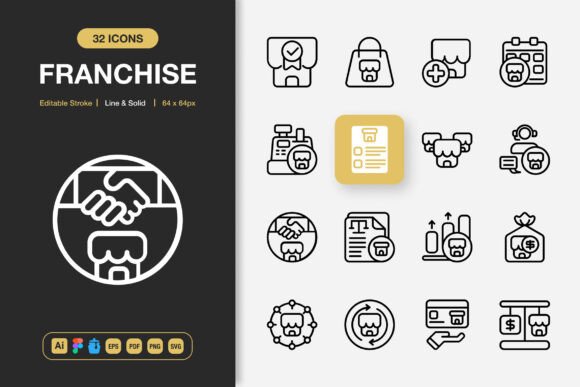
Franchise Icons: A Versatile Design Asset for Modern Creators
Every designer, developer, and creative professional understands the quiet power of a well-crafted icon. In a world saturated with visual noise, the simplest graphical elements often carry the heaviest communicative load. A single icon can replace a paragraph of instruction, guide a user through an unfamiliar interface, or lend a brand identity the polish it desperately needs. Among the many resources available to today's creators, Franchise Icons stands out as a thoughtfully assembled collection that bridges the gap between aesthetic restraint and practical versatility.
What makes an icon set genuinely useful isn't merely the quantity of symbols it contains, but the coherence of its design language and the flexibility of its delivery. When you download an icon pack, you're not just acquiring image files—you're adopting a visual vocabulary that will speak on behalf of your project. Franchise Icons understands this responsibility and delivers a toolkit that respects both the art and the science of iconography.
The Philosophy Behind Minimalist Icon Design
Minimalism in icon design is often misunderstood as simplicity for its own sake. In practice, effective minimalist icons are the result of rigorous distillation—removing every unnecessary detail until only the essential visual cue remains. This is harder than it looks. A successful icon must be instantly recognizable at a glance, scalable across dramatically different sizes, and harmonious when placed alongside other elements in a layout.
The Franchise Icons collection embraces this philosophy wholeheartedly. Each symbol has been crafted with a clear understanding that icons serve as wayfinding tools for the human eye. Whether rendered at 16 pixels on a mobile navigation bar or blown up to 512 pixels on a retail banner, the stroke weights, corner radii, and spatial proportions hold their integrity. This consistency isn't accidental—it reflects a disciplined approach to grid-based design and optical balancing.
Dual Styles for Diverse Needs: Line and Solid Variants
One of the most practical decisions included in this icon set is the availability of two distinct stylistic treatments. The Line Style offers airy, lightweight symbols that breathe elegance into interfaces. Thin, precise strokes create icons that feel contemporary and unobtrusive—ideal for dashboards, settings panels, and any context where the icons should support rather than dominate the content.
The Solid Style counterpart provides filled, grounded versions of the same symbols. These carry more visual weight and work exceptionally well in navigation bars, call-to-action buttons, and scenarios demanding higher contrast. Having both styles at your disposal means you can maintain a consistent semantic meaning across your project while adapting the visual emphasis to suit different contexts. A shopping cart icon can appear as a delicate outline in a product listing and transform into a bold, solid indicator in the checkout flow—without the user ever perceiving a disconnect.
The Importance of Editable Stroke and Full Customization
Pre-made assets are only as valuable as they are adaptable. The inclusion of editable stroke functionality represents a significant advantage for designers who need iconography to conform to established brand guidelines. You can adjust stroke thickness to match your typography's weight, round or square off corners to echo your logo's geometry, or extend lines to create custom variations that feel native to your design system.
With 100 customizable parameters at your disposal, the creative possibilities extend far beyond simple color swaps. You can modify fill opacity, recolor individual segments, combine elements from different icons, or deconstruct symbols to use their components in new compositions. This level of control transforms the collection from a static resource into a living design kit that grows with your projects.
A Deep Dive into File Format Compatibility
Perhaps the most pragmatic strength of Franchise Icons lies in its comprehensive file format support. Seasoned designers know the frustration of finding a beautiful icon set only to discover it's delivered in a single format incompatible with their workflow. The multi-format approach taken here eliminates that friction entirely.
Source Files for Professional Workflows
The Adobe Illustrator source file serves as the cornerstone for vector editing. Designers working within the Adobe ecosystem can open the master document and access every icon in its native, editable form. Layers are organized logically, artboards are named clearly, and the construction of each symbol is transparent and modifiable.
For teams that have transitioned to collaborative, browser-based tools, the Figma File inclusion is equally important. Figma has become an industry standard for interface design, and having icons that can be directly imported into your design library streamlines the handoff between designers and developers. Components can be published to team libraries, ensuring that every stakeholder uses the same icon versions across all mockups and prototypes.
Specialized and Universal Formats
The IconJar File format is a thoughtful addition for Mac users who rely on icon management software to organize and search through thousands of symbols. Dragging an IconJar-compatible file into the application instantly populates a searchable, taggable library that integrates with design tools through drag-and-drop functionality.
The EPS Version 10 format ensures backward compatibility with older software and printing workflows that still depend on Encapsulated PostScript. Meanwhile, the PDF File provides a universally accessible vector format that can be opened on virtually any device without specialized software.
For web and digital projects, the SVG File format is indispensable. SVGs are lightweight, resolution-independent, and can be styled with CSS or animated with JavaScript. They render crisply on retina displays and high-DPI screens without any of the blurring associated with raster images. The PNG Transparency files offer a ready-to-use raster alternative with transparent backgrounds, perfect for quick implementations where vector editing isn't required.
Real-World Applications Across Media Types
The versatility of Franchise Icons becomes apparent when you consider the breadth of projects it supports. Let's explore how these icons function across different contexts.
Websites and Mobile Applications
In digital product design, icon consistency directly impacts perceived usability. Users may not consciously notice that all navigation icons share the same stroke width, but they'll certainly feel the cognitive friction when they don't. Using Franchise Icons throughout a website or app creates a cohesive visual rhythm that reduces mental load and makes interfaces feel intentionally designed. From hamburger menus to filter controls, from social sharing buttons to status indicators, the collection covers the functional spectrum that modern digital products require.
Books, eBooks, and Educational Materials
Publishing professionals will appreciate how these icons enhance instructional clarity. A cookbook can use consistent ingredient icons, a textbook can employ standardized chapter markers, and an eBook can feature navigation symbols that remain legible even on monochrome e-ink displays. The line style variants work particularly well in print contexts where excessive ink coverage could bleed on absorbent paper stocks.
Social Media and Infographics
Content creators operating across social platforms need visual assets that maintain their impact when scaled down to thumbnail sizes or compressed by platform algorithms. The clean geometry of Franchise Icons survives these transformations admirably. Infographics benefit from the consistent styling, allowing data points and categorical labels to form a unified visual hierarchy without competing for attention.
Flyers, Banners, Posters, and Print Collateral
Large-format print demands icons that can scale without revealing imperfections. Vector formats like AI, EPS, and SVG ensure that icons blown up to poster dimensions retain their crisp edges without pixelation. Event flyers, retail banners, and conference posters can all leverage these icons for amenity indicators, directional cues, and feature highlights.
Who Benefits Most from This Icon Collection
The user base for Franchise Icons spans a remarkably broad spectrum. Freelance designers gain a reliable go-to resource that reduces the need to create common icons from scratch, freeing up billable hours for higher-value creative work. Startup founders and small business owners without dedicated design teams can produce professional-looking materials without outsourcing every visual element. Marketing agencies can standardize iconography across multiple client projects, building efficiency into their production pipelines. Educators and content developers can enrich their materials with clear visual cues that aid comprehension and retention.
Even developers working solo on side projects benefit enormously. The ready-to-use PNG and SVG files mean you can implement polished iconography without opening a design tool, while the source files remain available for occasions when customization is warranted.
Practical Considerations When Selecting an Icon Set
Before committing any icon collection to a project, there are several factors worth evaluating. First, consider visual congruence—do the icons share consistent design rules? In the case of Franchise Icons, the attention to stroke uniformity, corner treatment, and optical sizing suggests a disciplined construction methodology.
Second, assess semantic coverage. Does the collection include the symbols your project actually needs? While no single set can cover every conceivable concept, a well-rounded collection minimizes the need to source supplementary icons from disparate sources that might clash stylistically.
Third, evaluate technical compatibility. The multi-format delivery approach largely mitigates this concern, but it's worth confirming that your primary design tools are supported before making any asset a dependency of your workflow.
Finally, consider licensing terms. The inclusion of a Readme.txt file typically contains important information about usage rights, attribution requirements, and any restrictions on redistribution. Understanding these parameters upfront prevents complications as projects scale.
Drag, Drop, and Transform: The Integration Experience
The easy drag and drop implementation promised by this icon set reflects a design philosophy that values efficiency. When assets are organized logically and named descriptively, finding the right icon becomes a matter of seconds rather than minutes of browsing through cryptically labeled files. This may seem like a minor detail, but over the course of a project spanning weeks or months, the cumulative time saved by intuitive asset organization is substantial.
Integrating Franchise Icons into an existing project follows a straightforward path. For web projects, SVG files can be dropped directly into your codebase and referenced inline or as external assets. For print work, the AI or EPS files open natively in Adobe applications. For collaborative design work, the Figma file imports into your team workspace with components ready to be published. This multi-entry-point approach respects the diversity of modern creative toolchains rather than forcing users into a single prescribed workflow.
Strengths and Honest Limitations
Every design resource has its sweet spot, and Franchise Icons is no exception. Its strengths lie in aesthetic consistency, format versatility, and the practical convenience of having both line and solid variants for each symbol. The editable stroke capability alone addresses one of the most common pain points designers encounter with pre-made icon sets.
As with any icon collection, projects with highly specialized or niche requirements may find that certain symbols need to be created or sourced separately. No icon set can anticipate every possible use case, and the value of Franchise Icons should be measured by how comprehensively it covers the general-purpose needs that constitute the majority of design work, rather than by whether it includes every conceivable variant.
Making the Most of Your Icon Investment
To extract maximum value from this collection, consider establishing a design token system that maps icon usage to specific contexts within your project. Document which icon styles apply to which scenarios, standardize sizing and spacing rules, and maintain a living style guide that evolves as your usage patterns mature. When team members can reference clear guidelines rather than making ad-hoc decisions, the visual integrity of your project remains intact even as it scales across multiple contributors and platforms.
The Franchise Icons collection represents more than a set of graphical files—it's a foundation upon which coherent visual communication can be built. Whether you're designing a mobile app, laying out a book, preparing social media content, or producing print materials, the right icons elevate your work from competent to polished. In a creative landscape where attention to detail separates memorable experiences from forgettable ones, having a reliable, adaptable, and comprehensive icon set at your disposal is not merely convenient—it's essential.