Evaluating the Ecology Icons Pack for Your Next Design Project
Selecting the right icon set can quietly shape the success of a digital or print project. The Ecology Icons Pack has drawn attention among designers who need nature-inspired visuals that balance clarity, adaptability, and professional polish. Rather than simply listing what is inside the download folder, this article takes a closer look at how the collection performs across real-world workflows, where it excels, and where you might want to pause and consider alternatives. The goal is to help you decide whether this particular set of high-quality icons aligns with the demands of your websites, mobile apps, books, social media layouts, infographics, flyers, print pieces, banners, and posters.
What the Ecology Icons Pack Actually Offers
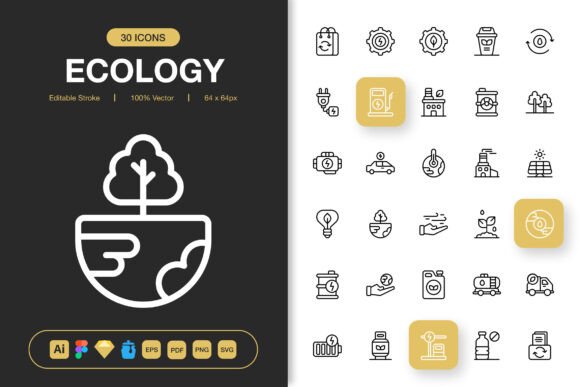
At its core, the Ecology Icons Pack is a curated selection of symbols tied to sustainability, nature, renewable energy, recycling, conservation, and green living. The file bundle covers a broad spectrum of professional formats, which immediately signals that the creators intended it for serious, multi-platform use. You will find an Adobe Illustrator source file, a Figma file, an Iconjar file, a Sketch file, an EPS Version 10 file, a PDF file, an SVG file, and PNG transparency exports at seven distinct pixel dimensions: 32px, 48px, 64px, 96px, 128px, 256px, and 512px. A Readme.txt file rounds out the package. This format diversity reduces friction when moving between screen design, presentation decks, and print production.
What makes the collection stand out in a crowded marketplace is the emphasis on editable stroke construction and 100% customizable layers. For a minimalist icon design approach, stroke-based icons often feel more modern and airy than their filled counterparts. Because the strokes are editable, you can easily adjust thickness, change cap styles, or recolor individual elements without degrading quality. This flexibility is especially valuable when you need to match established brand guidelines or adapt the same icon for both light and dark interfaces.
Minimalist Design and Project Versatility
Minimalism in icon design is not just a passing trend. It supports faster user comprehension, scales gracefully across devices, and blends into a variety of visual identities without overpowering them. The Ecology Icons Pack adopts a clean, uncluttered line style that feels contemporary without tying you to a specific design era. This neutrality is a strategic advantage when you work on diverse client projects that range from corporate sustainability reports to playful educational apps.
Consider how these icons perform across the mediums mentioned in the pack description:
- Websites and mobile apps: The pixel-perfect PNG sizes and SVG file support make implementation straightforward. Scalable vector files ensure that icons remain crisp on high-density retina screens, while the editable stroke property allows you to harmonize line weights with custom typography or UI elements.
- Books and print materials: The inclusion of EPS Version 10 and PDF files addresses the needs of print designers who require vector precision at any enlargement. Whether the icon sits at the start of a book chapter or dominates a poster layout, the resolution independence holds up.
- Social media, infographics, and flyers: Quick-turnaround marketing assets benefit from the easy drag and drop nature of the PNGs and SVGs. You can pull icons directly into Canva, Adobe Express, or Photoshop without conversion headaches.
- Banners and posters: Large-format graphics demand consistency. A single icon from this pack can appear at thumbnail size on a mobile screen and at billboard proportions without losing integrity, provided you work from the vector source files.
This breadth of application is one of the strongest arguments for investing in a well-structured icon set. Instead of hunting down individual icons from scattered free sources and wrestling with mismatched styles, you gain a cohesive visual language that ties your project together.
Key Features Evaluated
To make an informed decision, it helps to break down the advertised features and weigh their practical value. Below is an honest assessment based on what the Ecology Icons Pack claims to deliver.
Editable Stroke and High Quality
Editable stroke icons give you control that pre-expanded shapes simply do not offer. You can change the stroke width from a hairline to a bold line with a few clicks inside vector editing software. This matters when an icon needs to match a brand typeface or when the design calls for different icon weights across primary and secondary navigation elements. The high quality assurance means that paths are clean, nodes are minimal, and curves are smooth. Poorly constructed icons often have unnecessary anchor points, overlapping paths, or inconsistent rounding, all of which slow down production and cause rendering glitches. A high-quality set saves hours of cleanup time.
100% Customizable and Easy Drag and Drop
Customizability extends beyond stroke editing. Because the source files are layered and organized, you can change colors, remove elements, combine icons, or adjust proportions without starting from scratch. The easy drag and drop benefit is most apparent when using the PNG or SVG files in drag-and-drop website builders, presentation software like Keynote or Google Slides, and social media templates. You do not need deep design expertise to place these icons and achieve a polished result, which makes the pack accessible to content creators and small business owners who handle their own marketing.
File Format Depth
Not every project requires every format, but having multiple options future-proofs your purchase. The Adobe Illustrator file serves as a robust master source. The Figma file integrates directly into collaborative UI design workflows. The Sketch file supports macOS-centric design teams. Iconjar compatibility assists those who manage large icon libraries with metadata and search functionality. EPS and PDF act as industry-standard print vectors. SVG covers web and development needs, while the multiple PNG sizes handle scenarios where raster images are preferable. This thoughtful spread acknowledges that design pipelines vary widely from studio to studio.
Where the Pack Performs Best
The sweet spot for this collection lies in projects where a consistent, nature-oriented visual system needs to be deployed across multiple platforms quickly. Nonprofit organizations focused on environmental causes, educational publishers creating science or geography materials, sustainable brands building e-commerce experiences, and government agencies communicating green initiatives all stand to benefit. The minimalist icon design keeps the message clear and avoids visual clutter, which is essential when conveying data-driven infographics or instructions.
Another strong scenario is a design agency that regularly pitches eco-themed concepts. Having a ready-to-use, editable icon set reduces the turnaround time for mockups and presentations. Because the icons are highly customizable, the same core shapes can be reimagined across different brand color schemes without losing identity.
Points to Consider Before Committing
No icon pack is perfect for every situation, and a thoughtful evaluation includes identifying potential limitations. If your project requires a highly illustrative, hand-drawn, or whimsical aesthetic, the geometric precision of these minimalist icons may feel too restrained. The editable stroke approach naturally leans toward a clean, structured look, which may not fit brands that want a rougher, organic feel.
Icon coverage within the ecology niche also deserves attention. Does the pack include every specific symbol you need? Some collections excel in leaves and recycling symbols but lack depth in areas like renewable energy infrastructure, sustainable transportation, or biodiversity. Checking the icon list before purchase helps avoid gaps that force you to supplement with mismatched graphics later.
Additionally, while the easy drag and drop PNGs offer convenience, raster images limit editing flexibility compared to vectors. If you frequently need to recolor icons without accessing source design software, you will rely on the SVG files or the original editable source files. This is not a flaw of the pack itself, but it is a workflow consideration worth acknowledging.
How Different User Profiles Might Experience the Pack
Design professionals who work daily in Adobe Illustrator, Figma, or Sketch will likely find the source file inclusion to be the most valuable aspect. They can dig into layers, adjust strokes, and export exactly what they need. For them, the multiple PNG sizes are a convenience rather than a necessity.
Content creators and marketers may gravitate toward the pre-rendered PNGs and SVGs, appreciating the easy drag and drop into web platforms and presentation software. The consistent style across dozens of icons saves them from the patchwork look that often plagues assembled free icon packs.
Developers working on web or mobile applications will value the SVG and PNG outputs, especially the range of pixel sizes that cover standard and high-resolution displays. Clean, well-named files reduce implementation time and prevent the frustration of discovering that an icon raster is the wrong dimension late in the development cycle.
Print specialists will lean on the EPS and PDF files, confident that vector data will pass through prepress checks without rasterization artifacts. The availability of an Adobe Illustrator source file gives them an extra layer of control for complex color separations or brand-specific Pantone matching.
Making the Final Decision
When you weigh the Ecology Icons Pack against your current and upcoming projects, several questions can guide you toward a clear answer. Does your work regularly intersect with environmental, sustainability, or nature themes? Do you value a cohesive, minimalist look that adapts across digital and print without heavy rework? Is your workflow split across multiple design tools that would benefit from native file support? If these conditions feel familiar, the pack likely represents a sound investment that pays off in saved time and visual consistency.
On the other hand, if you only need one or two ecology icons for a single project, a smaller, more targeted purchase or even a high-quality free alternative might serve you better. If your brand language calls for filled, detailed, or heavily stylized icons, the stroke-based minimalism may not align without significant modification.
What makes this particular collection noteworthy is the deliberate combination of editable stroke architecture, broad file format support, and practical pixel size coverage. It signals an understanding of how modern designers actually work, moving fluidly between applications, screen sizes, and output mediums. The inclusion of a Readme.txt file, while small, suggests a level of care in documentation that can ease onboarding when team members access the assets later.
Ultimately, the Ecology Icons Pack positions itself as a dependable toolkit rather than a decorative afterthought. For projects that require high-quality icons with the flexibility to stretch across websites, mobile apps, books, social media, infographics, flyers, print, banners, and posters, it deserves a place on your shortlist. The minimalist icon design and easy drag-and-drop usability streamline both rapid prototyping and polished final delivery, which is exactly what busy creators need.