Pickleball Icons for Modern Design Projects
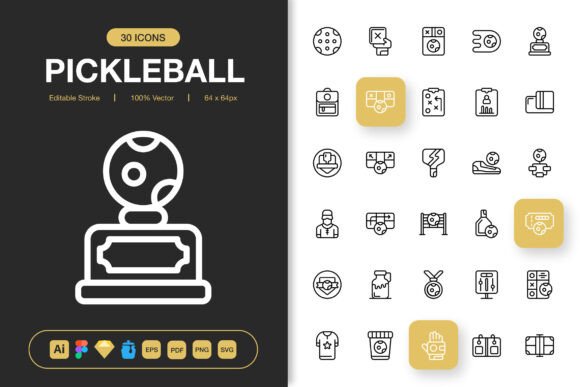
When you spend hours searching for the right visual elements only to find clunky, mismatched graphics, the whole creative process stalls. Pickleball Icons addresses this directly with a curated collection built for clarity, consistency, and speed. The set includes a broad range of pickleball-themed symbols—paddles, balls, nets, court markings, player silhouettes, and more—all crafted with clean lines and a minimalist approach that adapts to vastly different project types.
What sets this particular bundle apart is the combination of editable stroke properties, multiple file formats, and organized source files that slot into professional workflows without friction. Whether you design for screens, paper, or hybrid media, having icon assets that remain crisp and adjustable saves real time and reduces visual clutter. But the practical value of this resource shifts depending on who picks it up and what they intend to build.
What Actually Comes in the Icon Package
Before exploring who benefits most, it helps to understand the tangible contents. The collection is delivered as a multi-format toolkit. You receive the original Adobe Illustrator source file for deep customization, a Figma file for collaborative UI work, an Iconjar file for organized browsing, a Sketch file for macOS-centric design environments, along with EPS, PDF, SVG, and PNG exports at seven specific resolutions ranging from 32 pixels up to 512 pixels. A simple Readme file ties everything together with usage notes.
This structure means the icons are not locked into one ecosystem. The SVG files integrate smoothly into web code. The PNG transparency layers let you place graphics against any background without awkward white boxes. The high resolutions accommodate everything from tiny mobile touch targets to large-format banners. Having access to editable strokes also means line weights can match your brand guidelines rather than fighting against them.
Why the Editable Stroke Feature Matters More Than You Think
An icon set without editable strokes forces you to accept the designer's original thickness choices. With Pickleball Icons, you open the source files and adjust stroke width, cap styles, and corner joints until the visuals align perfectly with adjacent typography and interface elements. A thin, elegant stroke might suit a lifestyle blog header, while a heavier, bolder stroke works better for event signage viewed from a distance. This one feature shifts the asset from being a static download to a flexible design material.
How Different Audiences Find Value in the Same Icon Set
A single collection can serve contradictory needs simultaneously, and that paradox is worth understanding before you commit to any visual asset library. The minimalist nature of these pickleball icons means they recede appropriately in some contexts and command attention in others, depending on how they are deployed.
For Website and App Designers
Digital product designers evaluate icon packs through a lens of consistency and integration speed. Every icon needs to feel like it belongs with every other icon. The uniform stroke weight, matching corner radii, and consistent padding within each symbol make these pickleball icons sit naturally inside navigation bars, feature cards, onboarding flows, and footer sections. When a fitness booking app needs a recognizable paddle icon that does not distract from the primary interface, the clean geometry delivers exactly that.
Usability also improves when icons scale predictably. The included PNG files at stepped sizes remove guesswork for responsive breakpoints. The SVG format allows inline placement where CSS animations or color changes respond to user interaction, such as a paddle icon that subtly shifts hue on hover to indicate a clickable element.
For Print Designers and Publication Creators
Print work demands resolution independence. A graphic that looks sharp on a screen may fall apart when printed at 300 DPI for a magazine spread or a tournament brochure. The EPS and PDF vector formats in this bundle maintain edge fidelity at any physical dimension. A flyer promoting a local pickleball league can feature a large net icon as a background watermark without pixelation, and the same icon can shrink down to a tiny bullet point marker in a printed rulebook.
Educators producing instructional booklets about pickleball fundamentals often need diagrams that stay legible at small sizes. Icons depicting grip positions, serve trajectories, or court zones communicate faster than paragraphs of text. Since the strokes are editable, thicker lines can be applied specifically for black-and-white laser prints where fine hairlines tend to disappear.
For Social Media Content Creators and Marketers
Speed and platform adaptability drive content creation schedules. Marketers promoting pickleball events, product launches, or tutorial content need graphics that look native across Instagram stories, Facebook posts, Pinterest pins, and YouTube thumbnails. The transparent PNG files drop straight into Canva, Photoshop, or browser-based editors without requiring manual background removal.
Infographics benefit especially from icon-based storytelling. A visual step-by-step guide showing how to score a pickleball game becomes clearer when each scoring rule pairs with a simple icon. The drag-and-drop convenience of the pre-organized files means even creators who do not consider themselves technical designers can build professional-looking assets in minutes. The minimalist aesthetic also prevents the icons from clashing with brand color palettes, since neutral line art accepts any accent color applied via fill or overlay.
For Small Business Owners and Entrepreneurs
A local pickleball facility, a paddle manufacturer, or an online coaching service all share a common need: visual assets that reinforce credibility without requiring a full-time design team. Using mismatched clipart from disparate sources signals disorganization. Deploying Pickleball Icons across a website, email newsletter, price sheet, and physical signage creates visual coherence that customers register subconsciously as professionalism.
Customization matters here because businesses often need to recolor icons to match existing logos. The editable source files allow complete color overrides, stroke adjustments, and even compositional edits where two icons combine into a new symbol. A paddle icon plus a checkmark icon might become a custom badge for certified instructors. This flexibility extends the utility of a single purchase across months of marketing needs.
For Hobbyists and Community Organizers
Recreational players who manage neighborhood pickleball groups, charity tournaments, or social media pages for their local courts often handle design tasks informally. The learning curve for professional design software can intimidate, but the drag-and-drop PNG files at common resolutions slot into user-friendly platforms effortlessly. A volunteer creating bracket sheets for a weekend round-robin tournament can place court icons next to match times and player names without needing to understand vector editing.
The Readme file included in the package provides straightforward guidance that lowers the barrier further. Knowing which file type to use for a specific output—SVG for a website, high-resolution PNG for a printed poster—removes the technical guesswork that often leads hobbyists to abandon a project in frustration.
Evaluating Whether This Icon Set Matches Your Project Goals
Not every icon collection suits every project. Asking a few honest questions clarifies whether this particular set aligns with what you are building. Consider the visual personality you want to project. If your brand leans toward hand-drawn whimsy, gritty textures, or highly detailed illustrations, the minimalist geometry might feel too restrained. If you prioritize clarity, speed of recognition, and adaptability across media, the match improves significantly.
Think about your primary output channels. A web developer who frequently writes SVG inline code will value the clean markup and editable strokes. A print designer producing large-format tournament banners will lean on the vector source files. A social media manager juggling weekly posts across five platforms will appreciate the drag-and-drop PNGs at ready-to-use sizes. The collection serves each of these scenarios without forcing unnecessary complexity on any single user type.
Also weigh how often you need to edit the icons themselves. If you only need to drop them into place without modification, the raster PNG files at preset dimensions handle that efficiently. If you need to change colors, stroke widths, or combine elements, the Adobe Illustrator, Figma, Sketch, and EPS files open up full control. Having both options in one download means you do not pay extra when needs evolve from simple placement to deeper customization.
File Format Decisions Based on Output Type
Choosing the right format from the included bundle prevents technical headaches later. Use the SVG files for websites, interactive prototypes, and any context where scalable vector display matters. The PNG files with transparency work best for presentations, social media graphics, and drag-and-drop editors that do not parse vector data. The 512-pixel PNGs handle high-resolution displays and print pieces up to moderate sizes without visible degradation.
For professional design workflows, the source files—Illustrator, Figma, Sketch—preserve layers, editable paths, and stroke properties. This means you can access individual icon components, adjust them, and export new variations specific to a client brand guide. The EPS and PDF vectors serve as universal exchange formats when collaborating with print vendors or other designers who may use different software.
The Iconjar file deserves special mention for designers who manage large asset libraries. Instead of hunting through folders, you load the icons into Iconjar, search by keyword, and drag directly into your working document. This organizational layer saves cumulative hours over the lifespan of a recurring project.
Practical Examples Across Different Project Types
Imagine a freelance web developer building a booking platform for pickleball courts. The interface needs a recognizable paddle icon for the main navigation, small icons for amenity labels like lighting and seating, and a larger hero graphic for the landing page. Pulling all three from the same icon set guarantees visual harmony. The SVG versions render sharply at every viewport width, and the editable strokes allow fine-tuning to match the weight of the chosen typeface.
Consider a print shop producing 500 tri-fold brochures for a regional pickleball association. The EPS vector file drops into layout software and scales to fill a panel without pixelation. Icons denoting skill levels, equipment checklists, and venue locations organize information into scannable sections. Since the source file remains editable, the print designer can adjust line thickness for readability on matte paper stock.
Think about a content creator filming a YouTube tutorial on pickleball serves. The thumbnail needs a bold, simple paddle icon overlaid with contrasting text. A 512-pixel PNG loads into the editing software, accepts a vibrant color fill, and stays crisp when YouTube compresses the image. The same icon shrinks down for a lower-third overlay during the video, maintaining legibility because the minimalist design avoids fine details that blur at small scales.
Picture an educator assembling a digital handbook for physical education teachers introducing pickleball to students. Icons marking safety reminders, court boundaries, and grip styles supplement written instructions. SVG files embed directly into HTML-based e-learning modules, allowing the icons to resize responsively on tablets and phones that students bring to class.
Long-Term Usefulness of a Well-Organized Icon Library
Design assets often sit unused when they arrive as disorganized folders with cryptic file names. The structure of Pickleball Icons includes clearly labeled folders by file type and resolution, plus a Readme file that explains compatibility. This organization matters six months later when you return to the files for a new campaign and need to find the right variant quickly.
The multi-format approach also protects against software changes. A designer who moves from Sketch to Figma does not lose access. A developer who needs PNGs today but SVGs tomorrow has both available. This redundancy ensures the purchase remains useful as tools and project requirements shift over time.
For businesses, the license terms associated with the download matter practically. The files can appear across commercial projects, marketing materials, product interfaces, and client deliverables without additional royalty concerns. This broad permission scope makes the icons a one-time procurement decision rather than a recurring budget line.