Hologram Icons: Futuristic Design Assets for Creatives
Imagine pulling a glowing, translucent symbol straight out of a sci-fi interface and placing it into your next branding project. That is the immediate visual power Hologram Icons bring to the table. These aren't just flat vector shapes; they are meticulously crafted design elements that capture light, depth, and a distinctly modern aesthetic. In a visual landscape saturated with generic stock imagery, integrating a set of high-quality holographic icons can instantly shift a project from ordinary to extraordinary. Whether you are refining a user interface, designing an editorial spread, or crafting a memorable social media graphic, the right icon set acts as a silent ambassador for your brand identity, communicating innovation and forward-thinking visual design without saying a word.
Why Hologram Aesthetics Dominate Modern Visual Communication
The current graphic design zeitgeist leans heavily into textures that blend reality with digital fantasy. Glassmorphism, neon accents, and iridescent color palettes have become staples in UI design and branding, largely because they capture attention in overcrowded digital spaces. Hologram Icons fit perfectly into this trend. They tap into a cultural nostalgia for retro-futurism while remaining firmly planted in cutting-edge digital marketing aesthetics. When you use these icons, you aren't merely adding decoration; you are establishing a clear design language that suggests transparency, high-tech precision, and creativity. This visual hierarchy ensures that key interface elements or marketing materials don't just inform the audience—they captivate them, enhancing user experience and visual communication simultaneously.
Unmatched Versatility Across Creative Projects
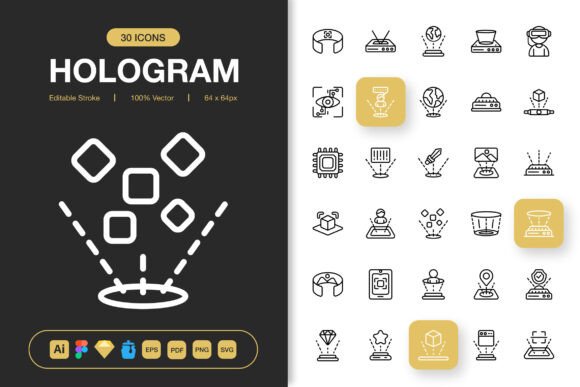
One of the most compelling reasons to add this particular collection to your creative assets is its sheer adaptability. Because the files are provided as fully editable strokes, you maintain absolute control over the thickness, color palette, and finish of every single icon. You can easily tweak the holographic glow to match an existing brand identity or dial it back for a minimalist, clean monoline logo design that still suggests depth. This isn't a rigid, one-size-fits-all download; it's a foundation for design inspiration.
Consider how these assets integrate across different mediums:
- Web Design & UI/UX: Replace static navigation icons with subtle holographic elements to create a futuristic web design. The scalable PNG transparency files ensure your app interfaces look razor-sharp on any screen resolution without breaking the visual flow.
- Editorial Design & Infographics: In print design, a touch of the unexpected can stop a reader in their tracks. Using these icons in magazines, reports, or instructional infographics injects a layer of editorial design sophistication that flat vectors simply cannot match.
- Presentation Decks & Social Media: In a corporate environment, professional presentation relies heavily on clarity and engagement. Swapping out standard bullet points for custom hologram icons in PowerPoint, Keynote, or social media graphics immediately raises the production value, holding client attention longer.
- Packaging & Merchandise: For product launches, especially in the tech, beauty, or entertainment sectors, these icons look stunning on packaging design. When printed with foil accents or spot gloss, they create a tangible, premium tactile experience that reflects modern aesthetics.
Streamlining Your Design Workflow
A brilliant visual concept loses its magic if the technical execution is a headache. This is where the thoughtful packaging of this icon set truly shines. A common friction point in graphic design is receiving a flat raster image when you need a fully layered vector. This collection sidesteps that entirely by providing an extensive range of source files, ensuring compatibility with virtually any design workflow. You get the original Adobe Illustrator file for deep customization, a Figma file for collaborative UI design, and a Sketch file for Apple-centric ecosystems. For those who prefer organized libraries, the inclusion of an Iconjar file is a massive time-saver, allowing you to search, drag, and drop icons without ever leaving your design environment.
Beyond the source files, the bitmapped options are prepared with meticulous attention to scalability. The PNG transparency files come pre-rendered in a massive range of sizes—from the delicate 32px suitable for footers and metadata, up to the massive 512px perfect for hero banners and large-format print. This bypasses the tedious process of manual exporting and guarantees that your visual hierarchy remains crisp across every application, from a tiny favicon to a towering billboard poster.
Customization and Minimalist Mastery
While the concept of "hologram" often evokes rainbows and chrome, the true strength of this set lies in its minimalist icon design foundation. The base shapes are stripped of unnecessary clutter, adhering to clean geometric principles that honor typography and balance. Because the strokes are easily customizable, you can apply a monochromatic brand color palette to the entire set in seconds, effectively turning a holographic masterpiece into a sleek, unified logo design toolkit. This flexibility ensures that the product grows with your creative projects rather than dictating a single restrictive look. It's an essential part of modern brand identity management, allowing you to maintain consistency while having the freedom to experiment with design trends.
Ultimately, investing in a robust set of Hologram Icons is more than a purchase; it's a strategic upgrade to your creative assets library. It removes technical barriers, sparks design inspiration, and ensures that the final output—whether a mobile app, a book cover, or a social media banner—leaves a lasting, professional impression. When the quality of your visual elements increases, the perceived value of the entire project follows, establishing a clear, confident voice in a noisy market. Thanks for making quality design a priority.